

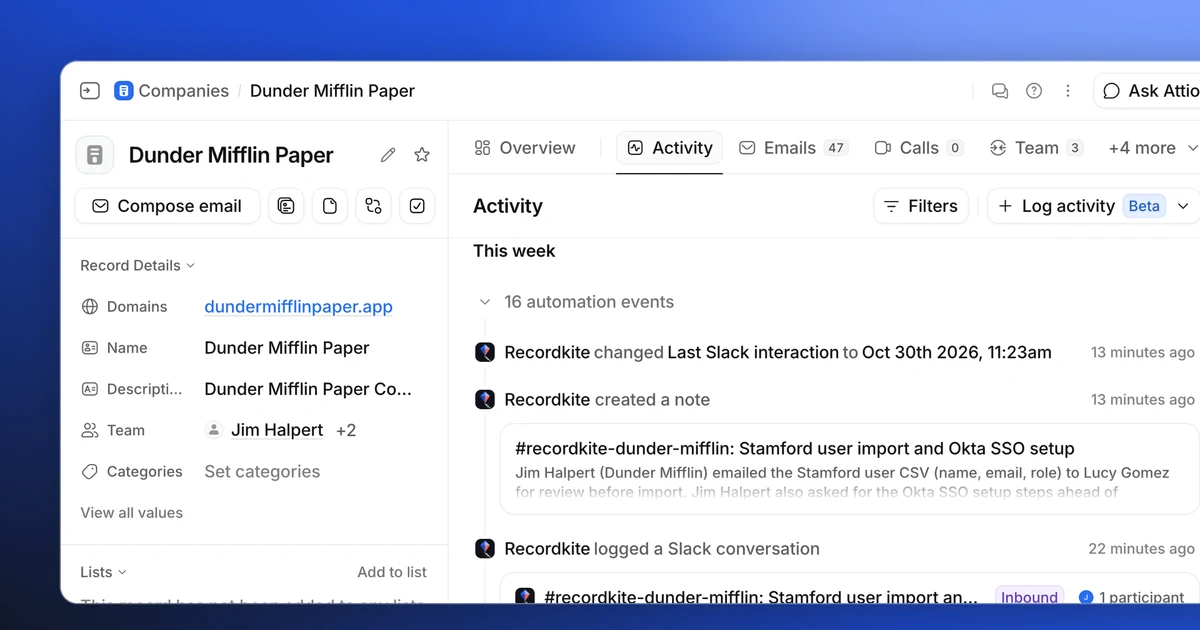
If you work with customers in shared Slack channels, a lot of your most important conversations happen there: feature requests, renewal questions, escalations, the "can we move the call to Thursday?" messages. Attio records your emails and meetings automatically, but none of those Slack conversations ever reach it. Your CRM can end up missing a lot of crucial information.
This guide shows you how to track customer Slack conversations in Attio with Recordkite, an app that logs conversations from your Slack Connect channels to the right company and people in Attio.
Attio can't log Slack messages on its own. Its Slack app sends notifications and workflow messages to Slack, but it can't read your channels. To track customer Slack conversations in Attio, add Recordkite to the Slack Connect channel you share with a customer and map that channel to the customer's Attio company. From then on, every new conversation appears in Attio as an AI summary note, a Slack conversation activity on the timeline, and an up-to-date Last Slack interaction date.
Prefer to watch? Here's the whole thing in under two minutes:
Why Slack conversations don't show up in Attio
Attio builds your relationship history from emails and calendar events. When you connect your mailbox and calendar, every email and meeting with a customer is logged to their company and people, and Attio's Last interaction attribute updates on its own.
Slack isn't part of that. Attio's Slack app lets you:
- post record and list changes to a channel,
- send messages from workflows, and
- ask Attio questions by tagging @Attio.
What it can't do is read the messages in a channel. So a customer can spend weeks talking to your team in a shared channel, and their Attio record still says you last spoke a month ago.
What you get in Attio
Recordkite reads the Slack Connect channels you choose and writes each conversation (not each message) to Attio:
| What it is | Attio plans | |
|---|---|---|
| Summary note | A note on the company for each conversation, with an AI summary, any next steps, who took part and a link back to Slack | All plans |
| Last Slack interaction | A date on companies, people and deals showing when you last spoke in Slack | All plans |
| Activity timeline | A Slack conversation entry on the Activity tab of the company, people and deals, with a one-line summary | Pro and Enterprise |
Attio only lets apps add their own activities on its Pro and Enterprise plans. On Free and Plus you still get the summary notes and Last Slack interaction.
Before you start
You'll need:
- An Attio workspace. Any plan works, but the Activity timeline needs Pro or Enterprise.
- A Slack workspace with at least one Slack Connect channel shared with a customer. Recordkite logs shared channels only, never direct messages or internal channels.
- Your work email. Personal addresses like Gmail can only join a team that has invited them.
- A Slack admin, if your workspace requires admins to approve new apps.
Setup takes about 15 minutes, plus a short onboarding call to connect Slack.
Step 1: Sign up and connect Attio
Sign up at app.recordkite.com with your work email. We email you a 6-digit code: type it in, then create your organisation. You become its Owner.
The Get started page then walks you through four steps and ticks each one off as you go.
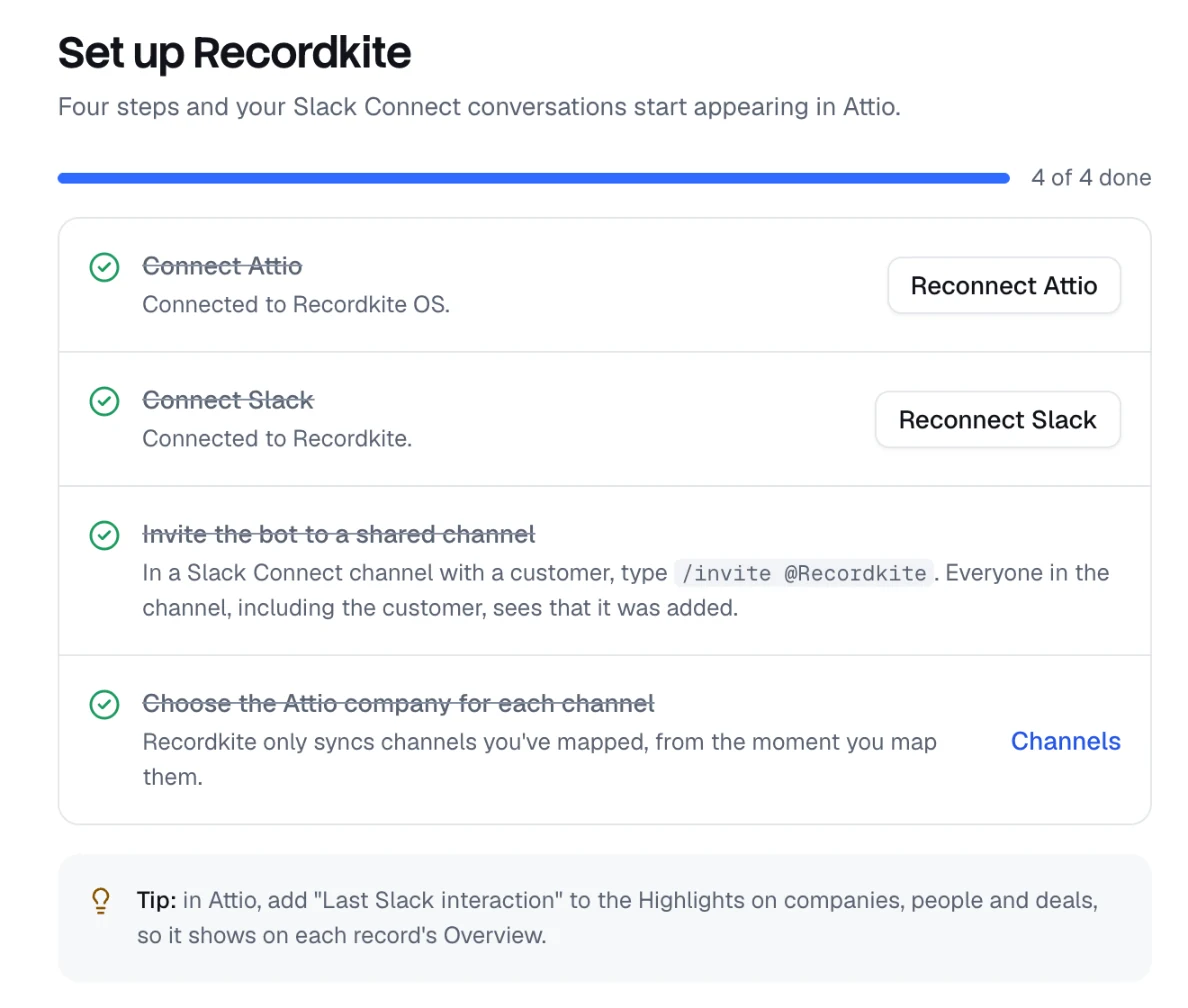
Click Connect Attio, choose the workspace you want conversations written to and approve Recordkite's access. Recordkite connects once for the whole workspace, so your teammates don't need to connect Attio themselves.
When you connect, Recordkite adds a Slack conversation activity type (on Pro and Enterprise) and a Last Slack interaction attribute to companies, people and deals.
Step 2: Connect Slack on your onboarding call
We connect Slack with you on a short onboarding call. We walk through what Recordkite can and can't see, answer any questions from your Slack admins and set up your first channel together.
Until the call, Get started shows Book your onboarding call. Click Book a call to pick a time.
If your Slack workspace requires admins to approve new apps, a Slack admin will need to approve Recordkite. Invite them to the call, or ask them to approve it beforehand.
Step 3: Add Recordkite to a shared channel
In Slack, open a Slack Connect channel you share with a customer and type:
/invite @Recordkite
Everyone in the channel, including your customer, sees that Recordkite was added, so nobody is logged without knowing it's there.

Step 4: Map the channel to an Attio company
Back in the dashboard, the channel now appears on the Channels page. Click Map next to it.
Recordkite suggests the Attio company for you. It looks at a company you've already confirmed for that Slack organisation, then the email domains of the outside people in the channel, then the Slack organisation's name. Check the suggestion, choose any deals to link (the company's open deals are selected for you) and click Save.
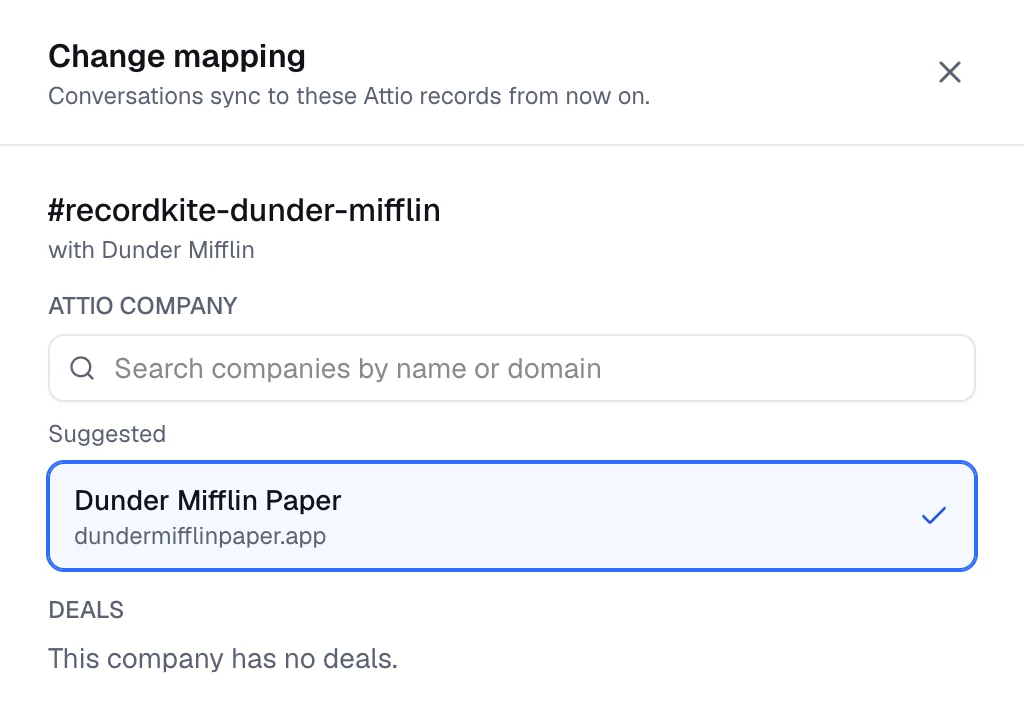
Recordkite starts logging new conversations straight away. It doesn't copy old messages: logging starts from the moment you map the channel.
Step 5: Check the people are linked
When you map a channel, Recordkite also links the people in it to Attio, so conversations show on their person records as well as the company's:
- Your customer's people are linked automatically when their Slack email matches an Attio person. If only their name matches someone at the company, Recordkite suggests the match for you to confirm.
- Your team is matched to your Attio workspace members by email.
- Anyone it can't place appears under People → Who is this? for you to link once. Recordkite remembers every link after that.
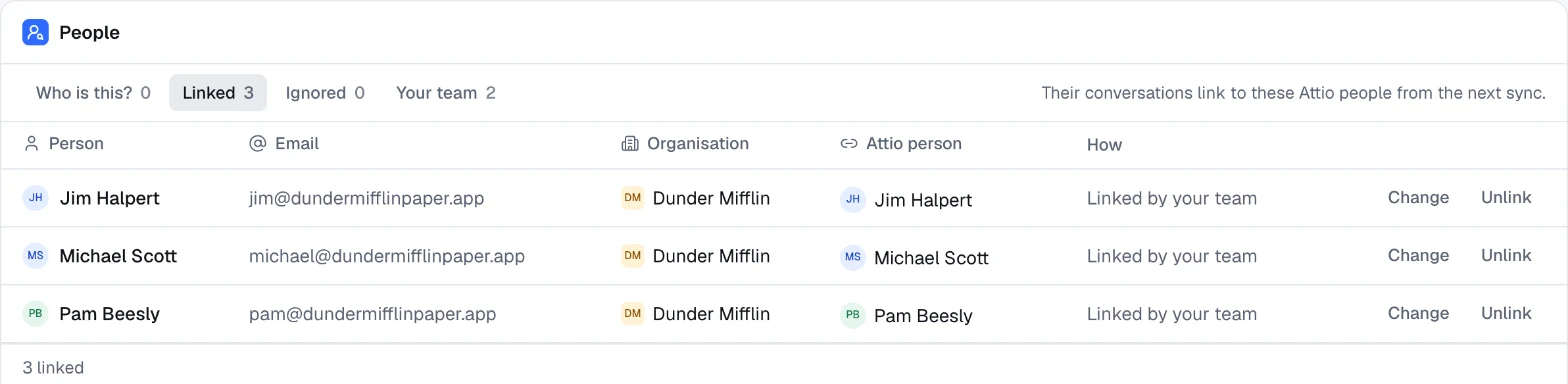
That's the setup done. From now on, conversations in that channel show up in Attio on their own.
What it looks like in Attio
In the demo, we have a shared channel between our team and a customer, Dunder Mifflin. Three people from each side are in it.
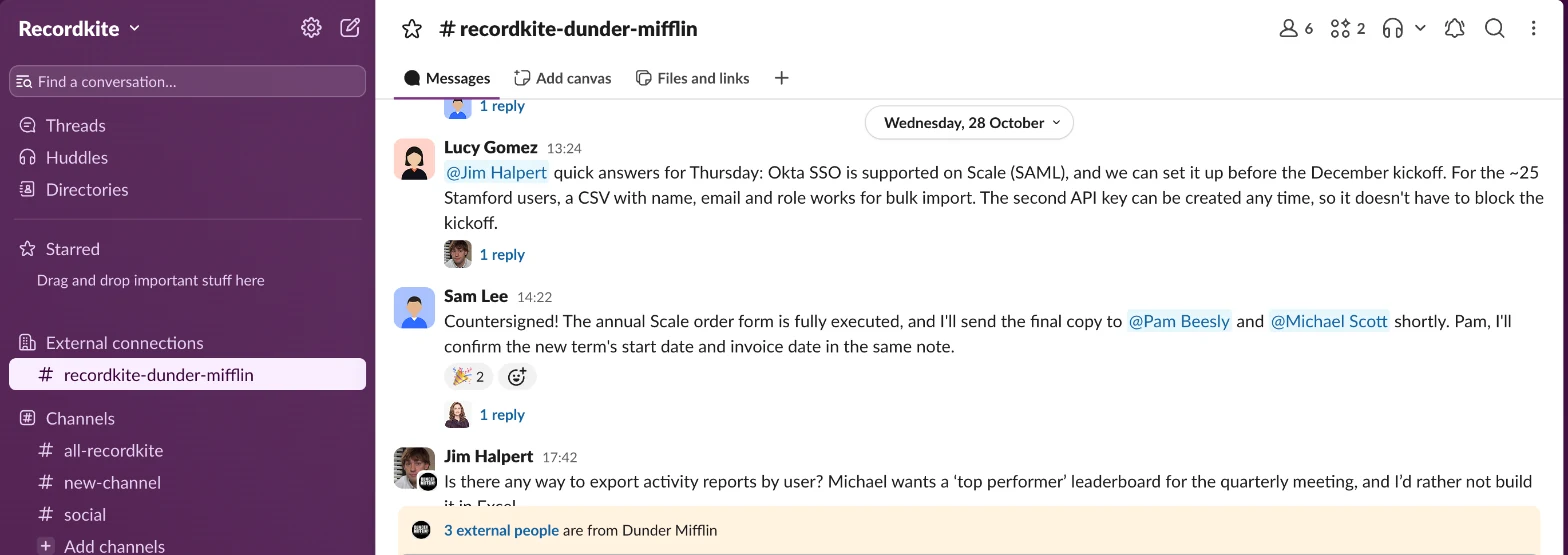
Jim from Dunder Mifflin posts a question in the channel. A few minutes later, here's what you see on the Dunder Mifflin Paper company in Attio.
Last Slack interaction
Last Slack interaction updates to the time of Jim's message. Add it to the Highlights on companies, people and deals so it shows at the top of each record's Overview.
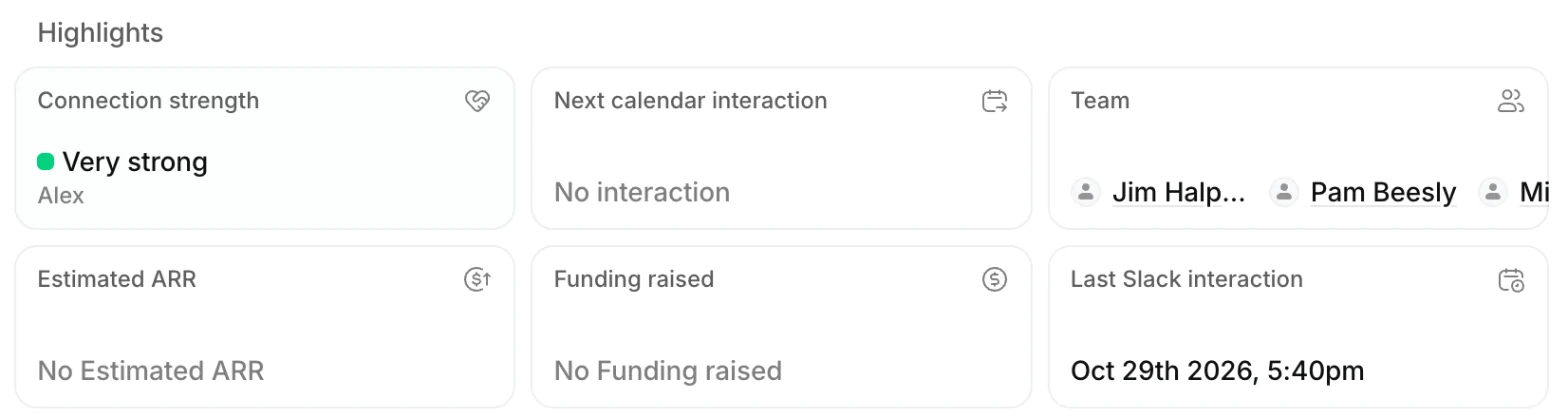
Attio's own Last interaction only counts emails and meetings, so this is the date to use for "when did we last talk to this customer in Slack?". You can sort, filter and build views on it like any other attribute: for example, a view of customers nobody has spoken to in Slack for 30 days.
The Activity timeline
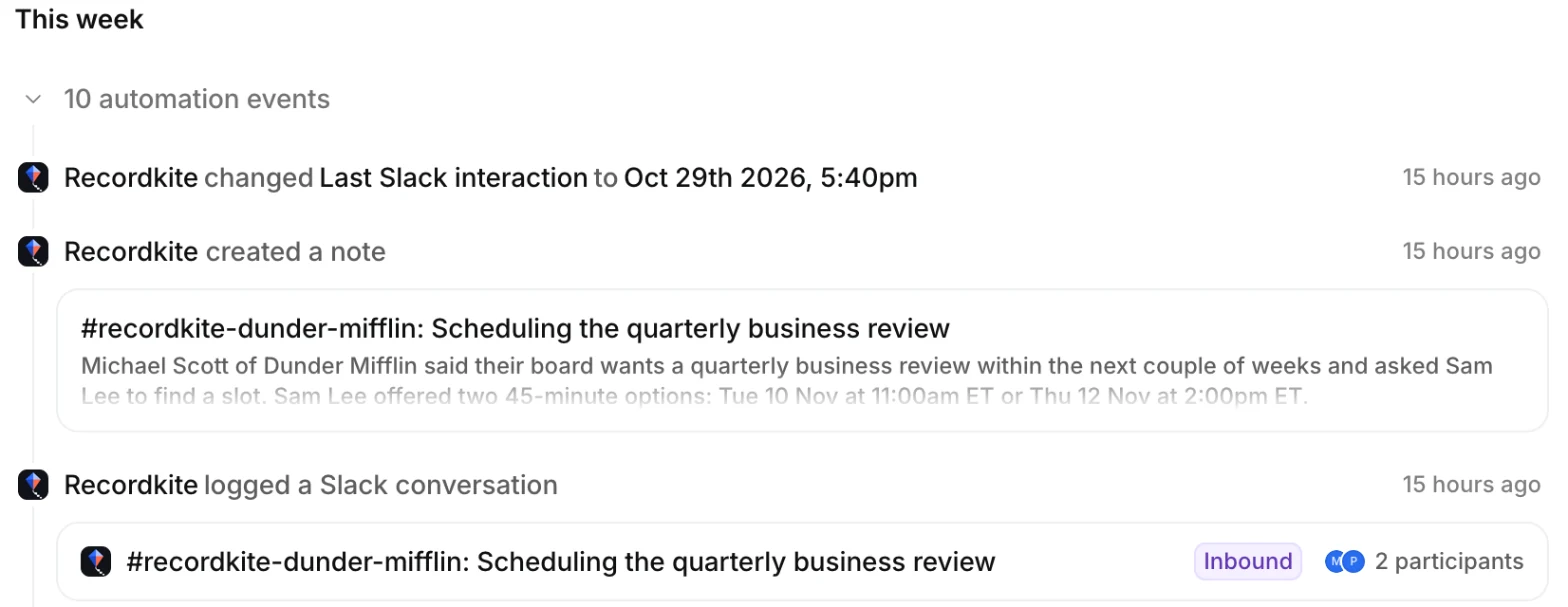
On Attio Pro and Enterprise, the conversation appears on the Activity tab as a Slack conversation. Attio groups entries written by apps into automation events, so click the group to expand it.
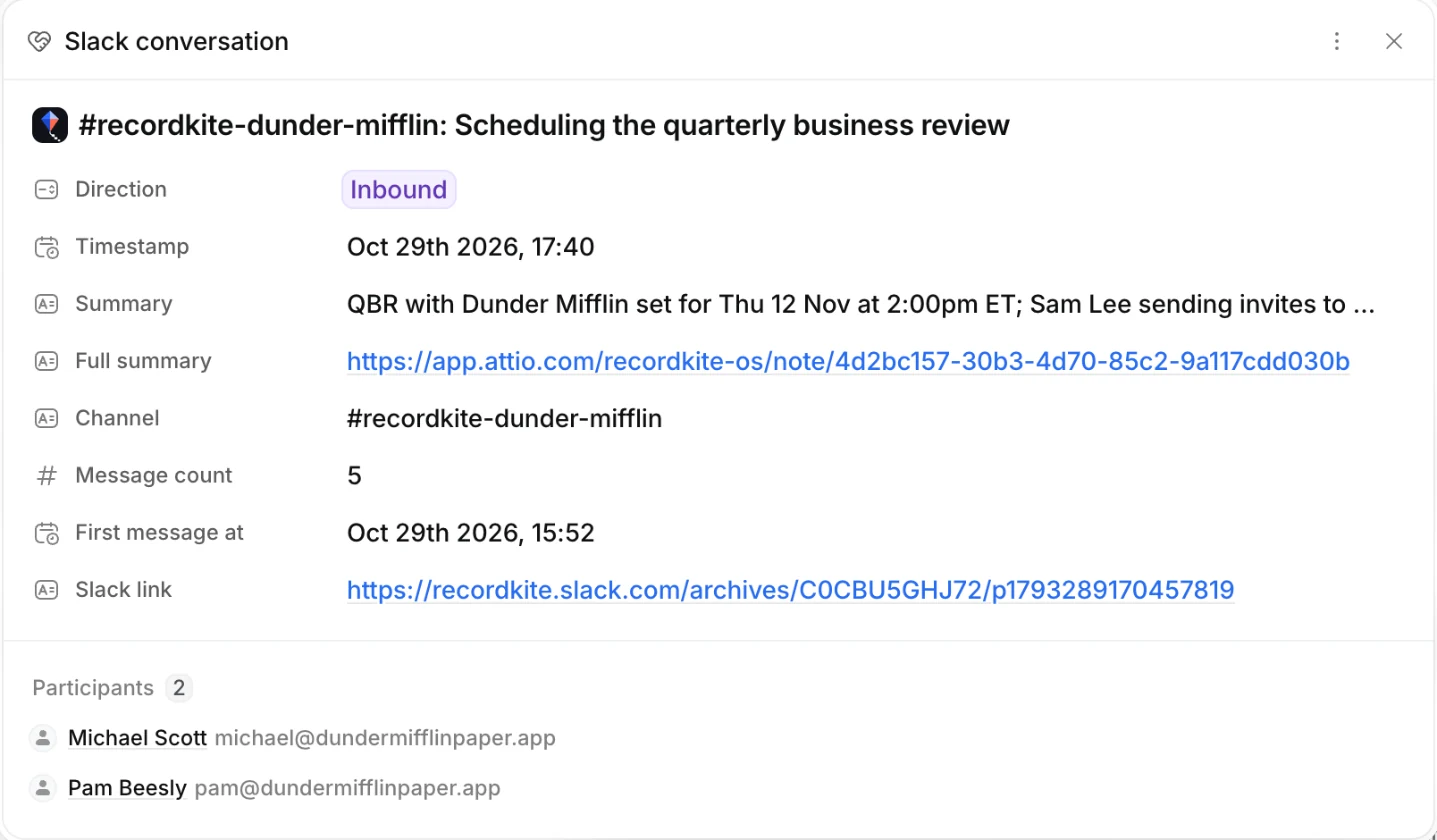
Open it to see the details: whether the customer or your team started it (Inbound or Outbound), a one-line summary, the channel, the number of messages, when it started, a link to the conversation in Slack, and the people who took part.
The AI summary note
Every conversation also gets a note on the company, on every Attio plan. It has a full AI summary, including next steps, who took part and which organisation they're from, and a View in Slack link.
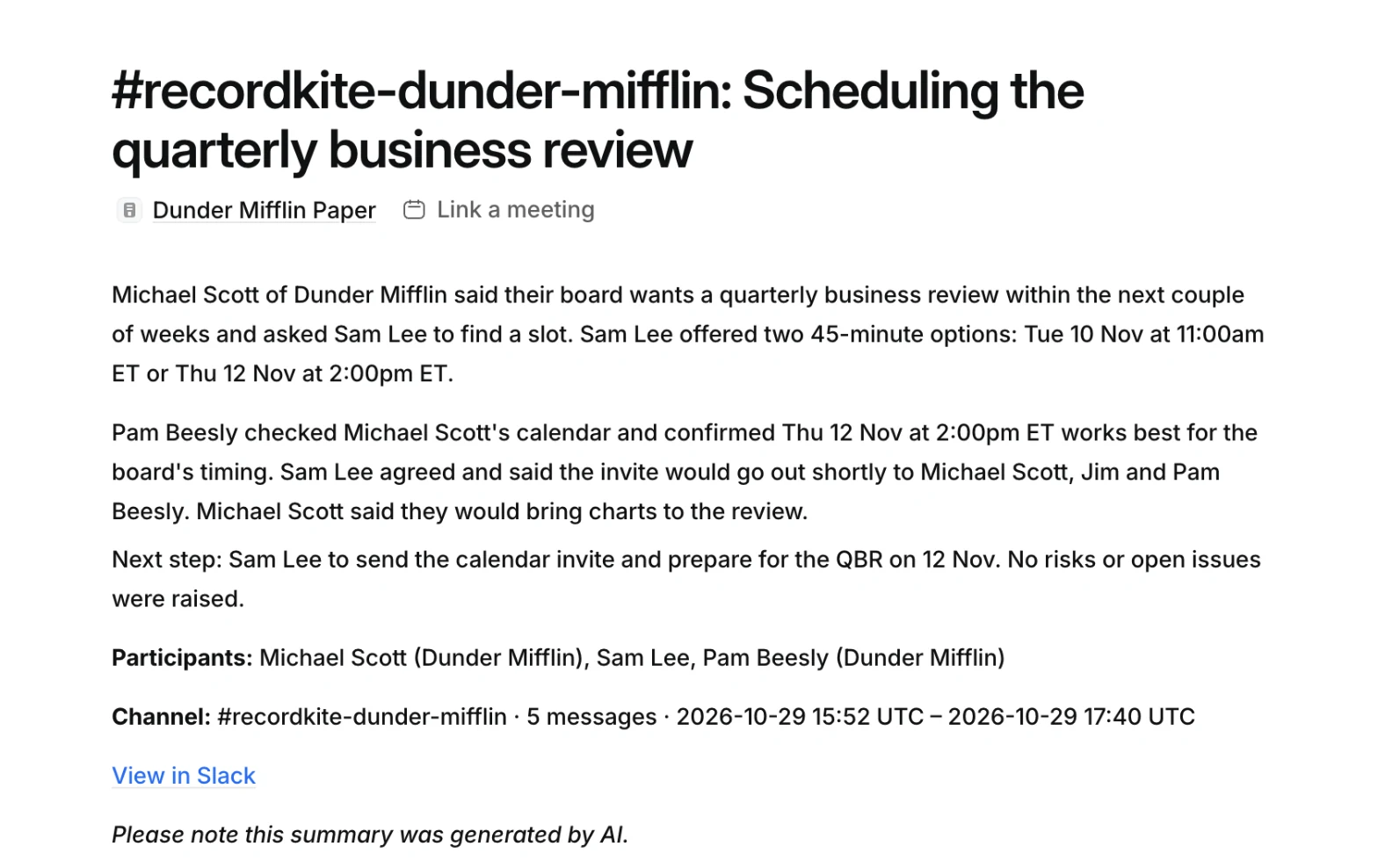
In the demo, the note explains that Jim asked whether we can support a specific feature, and that Michael followed up to stress how important it is because of pressure from his boss. Anyone who opens the record gets that context in seconds, without scrolling back through Slack.
How Recordkite groups messages into conversations
Logging every Slack message as its own entry would bury your Attio records. Recordkite writes one entry per conversation instead:
- A thread (a message and its replies) is one conversation. Later replies update it; a reply more than 30 days after the last one starts a new conversation.
- Messages outside threads are grouped by topic using AI, so two discussions happening in the same channel on the same day become two conversations. A conversation stays open while people keep talking about the same subject, and closes after 72 hours of quiet.
- Emoji reactions aren't logged as messages, but they're used in the summary (a 👍 on a question is an answer).
- Files are linked from Slack, never copied.
- Conversations only between people on your own team aren't logged. If two of your colleagues talk in a shared channel and nobody from the customer joins in, that conversation stays out of Attio.
While a conversation is active, Recordkite updates Attio every 15 minutes, and the latest version of the note replaces the old one.
Other ways to track Slack conversations in Attio
Recordkite isn't the only option. Here's how the common approaches compare:
| Approach | How it works | What you get | Downsides |
|---|---|---|---|
| Copy and paste into notes | Someone copies important messages into an Attio note by hand | Whatever they remember to copy | Relies on people remembering; no Last Slack interaction; context gets lost |
| Attio's Slack app | Connects Attio to Slack for notifications, workflow messages and Ask Attio | CRM updates posted to Slack | Can't read channel messages, so nothing from Slack is logged in Attio |
| Zapier, Make or n8n | A workflow that copies each new Slack message into Attio | A raw copy of messages | One entry per message; no grouping, summaries or people matching unless you build them; another workflow to maintain |
| Recordkite | An app added to your Slack Connect channels, mapped to Attio companies | AI summary notes, Activity timeline entries and Last Slack interaction, on the right company, people and deals | Slack Connect channels only (no DMs); paid, from $79 a month |
If you only need the odd message in Attio, copying it into a note is fine. If shared channels are where your team actually works with customers, an automated, per-conversation log is the only way the CRM keeps up.
Privacy and security
Customer conversations are sensitive, so Recordkite keeps as little as possible for as short a time as possible:
- It only logs Slack Connect channels you've added it to and mapped. It can't read direct messages, and if a channel stops being shared with another organisation, it stops logging it.
- Slack messages are encrypted as soon as they arrive and held only while their conversation is active: a day after the last message, and never longer than 7 days. Recordkite doesn't keep your message history.
- To update ongoing conversations, it keeps an encrypted summary of each one for 30 days after its last message. Your notes and activities live in Attio.
- Each organisation's data is encrypted with its own key, which Recordkite manages for you. Deleting your organisation destroys it.
- AI summaries use only zero-data-retention endpoints, and your content is never used to train AI models.
See Security and data in the help centre for the details.
Frequently asked questions
Does Attio have a Slack integration?
Yes. Attio's Slack app posts record and list changes to channels, sends messages from workflows and lets you ask Attio questions by tagging @Attio. It can't read the messages in your channels, so it doesn't log Slack conversations in Attio. Recordkite does that part.
Can Attio log Slack messages automatically?
Not on its own. Attio logs emails and calendar events automatically, but not Slack. Recordkite adds that: it logs each conversation in your Slack Connect channels to the matching Attio company, people and deals.
Does Recordkite work on Attio's Free and Plus plans?
Yes. Summary notes and Last Slack interaction work on every Attio plan. The Activity timeline needs Attio Pro or Enterprise, because Attio only lets apps create their own activities on those plans. If you upgrade later, reconnect Attio in Recordkite's Settings to add the timeline.
Does Recordkite update Attio's Last interaction attribute?
No. Attio's Last interaction only counts emails and meetings, and apps can't change it. Recordkite keeps its own Last Slack interaction attribute on companies, people and deals instead.
Will Recordkite log our internal channels or DMs?
No. It only logs Slack Connect channels shared with another organisation that you've added it to and mapped to an Attio company. Direct messages and internal channels are never logged.
Can Recordkite import past Slack conversations?
No. Recordkite logs conversations from the moment you map a channel.
How quickly do conversations appear in Attio?
Within minutes. While a conversation is active, Recordkite updates Attio every 15 minutes.
How much does Recordkite cost?
Recordkite is priced per Attio workspace, by the number of mapped Slack Connect channels: Starter is $79 a month for up to 10 channels, Growth $199 for up to 40 and Scale $449 for up to 150. There's no charge per person. See pricing.
Get your Slack conversations into Attio
Book a 15-minute demo and we'll show you Recordkite on your own channels, or read the setup guide.